
Open Enrollment begins August 16 through August 31
During Open Enrollment, we may experience higher-than-normal call volume. If we are unable to answer your call, a member of the Benefits team will return your call within 24 hours.
Missed our recent Open Enrollment presentation? Watch the recording to learn more about FY27 benefits and Open Enrollment.
Open Enrollment is offered each year to review your current benefits and make elections for the upcoming plan year.
If no changes are made, benefits will rollover for the next plan year.
NOTE: If you are enrolled in the Flexible Spending Account (FSA), you must re-enroll. The FSA will not rollover.
Use this page to review what's changing for FY27, estimate your medical contributions, find an upcoming Open Enrollment session, and learn how to make changes to your benefit elections.
On this page
What's Changing for FY27?
On July 14, 2026, the Travis County Commissioners Court approved an increase to medical plans and plan changes to all UHC plans.
For FY27 there will be plan design changes, and an increase of 8% to medical plans. It is highly recommended that all participants review the plans carefully to determine which plans may be best for you.
FY27 Plan Changes
- New Pharmacy Benefit Manager: Rightway
- Flexible Spending Account (FSA medical) maximum increased from $3,300 to $3,400
- Flexible Spending Account (FSA dependent care) maximum increased from $5,000 to $7,500
- Health Savings Account (HSA) maximum contributions will increase effective January 1, 2027, from $4,400 to $4,500 for individuals and from $8,750 to $9,000 for Employee and Dependents
- Increase to vision premiums
Review Plan Information
- Medical Plan Comparison Summary
- Plan Cost Scenarios – Examples to help you pick the best plan for you and your dependents
- Medical, dental and vision premiums
- Employee Benefits Guide
- FY27 Open Enrollment Presentation
Additional Resources
- Meet Rightway! Your new Pharmacy Benefit Manager
- Rightway 2026 Formulary
- Davis Vision by MetLife Flyer
- Dental DHMO Summary/Copay List
- Base PPO 20 Plan Summary
- Preferred PPO 30 Plan Summary
- Preventive Only Plan Summary
Estimate Your Medical Contribution
Use the Employee Medical Contribution Calculator to estimate your medical plan costs based on the coverage option you select. The calculator is provided as a planning tool to help you compare available plans before completing Open Enrollment.
Look up your FY27 medical plan contribution by health plan and coverage level. Your FY26 rate is shown alongside for reference.
Please refresh the page. If the issue persists, contact HR Benefits.
Select a health plan and coverage level to see your contribution.
Your FY27 medical contribution:
for your selected plan and coverage level. FY26
| Contribution | — | — | Change |
|---|---|---|---|
| Per Month | — | — | — |
| Per Paycheck | — | — | — |
This calculator only compares medical plan contributions for active employees. It does not include dental, vision, optional benefits, taxes, or retirement deductions. Retirees have different rates.
Attend an Open Enrollment Session
Open Enrollment sessions are available both in person and virtually to help you understand your benefit options and complete your enrollment. HRMD Benefits staff and benefit vendors will be available to answer questions during sessions.
| Date | Location | Time | Details | Additional Resources |
|---|---|---|---|---|
| August 5, 2026 | TNR East Service Center – Community Room | 9–10 a.m. | 6011 Blue Bluff Rd., Austin, TX 78724 | |
| August 6, 2026 | Tax Office | 9 a.m.–12 p.m. | Presentations at 9:00 a.m. and 10:30 a.m. (Tax Office employees only). 2433 Ridgepoint Dr., Austin, TX 78754 |
|
| August 7, 2026 | Virtual | 11 a.m.–12 p.m. | Join Presentation | |
| August 11, 2026 | Virtual | 10–11 a.m. | Join Presentation | |
| August 11, 2026 | Virtual | 2:30–3:30 p.m. | Join Presentation | Presentation Recording |
| August 12, 2026 | TNR West Service Center – Community Room | 2–3 p.m. | 4501 FM 620 N, Austin, TX 78732 | |
| August 13, 2026 | 700 Lavaca St., Room 1334 | 2–3 p.m. | Spanish presentation. Validated parking available for the county garage. | |
| August 14, 2026 | Retiree Day – Election Training Room | 9:30 a.m.–12:30 p.m. | Retirees only. 5501 Airport Blvd., Austin, TX 78751 | |
| August 18, 2026 | Virtual (Teams) | 10–11 a.m. | Join Presentation | |
| August 20, 2026 | Virtual (Teams) | 2–3 p.m. | Join Presentation | |
| August 26, 2026 | TNR West Service Center – Community Room | 1:30–2:30 p.m. | 4501 FM 620 N, Austin, TX 78732 | |
| August 27, 2026 | TNR East Service Center – Community Room | 1:30–2:30 p.m. | 6011 Blue Bluff Rd., Austin, TX 78724 |
Additional Information
Benefit vendors may be available at most locations to answer questions about your benefits. Participating vendors may include UnitedHealthcare (UHC), Empower, and New York Life. HRMD Benefits staff will also be available to answer questions and assist with enrollment.
For virtual presentations, select Join Presentation at the scheduled meeting time.
How Do I Make Changes to My Plan?
Follow the steps below to review your current benefit elections and make changes during Open Enrollment.
Wait—Do You Need Help?
You don’t have to do this alone. Our Benefits team can help answer questions by calling 512-854-0404 to talk about your options and to ask any questions you may have about the overall process.
Please note: call volume may be high but if we’re unable to answer the phone, we will call back within 24 hours.
Sign in to SAP
Use your Travis County credentials to sign in to the SAP Employee Self-Service (ESS) portal from work or home. Once you're signed in, you'll be able to access your employee benefits and begin the enrollment process.
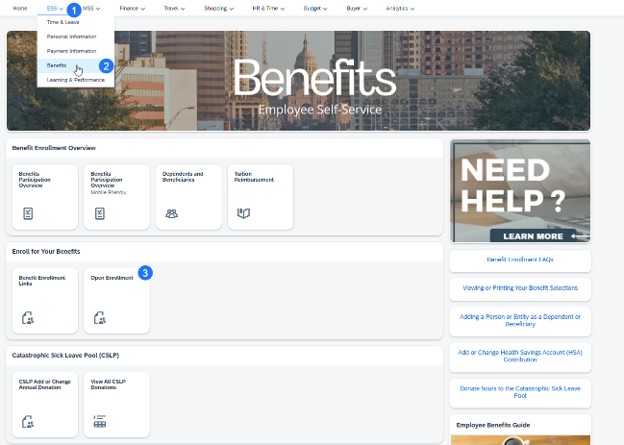
Open Benefits Enrollment
Navigate to the Benefits area in SAP ESS and select the current enrollment event. This is where you'll review your current benefit elections and make any updates for the upcoming plan year.
>
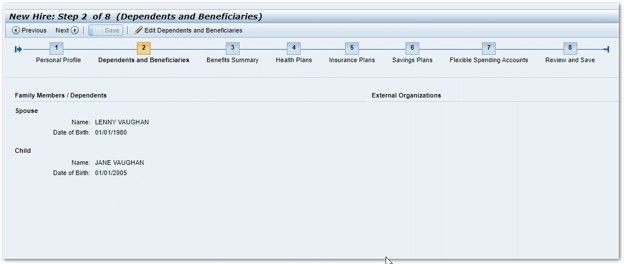
Add or Update Dependents
Review that your personal information is still accurate. If any changes need to be made, please review instructions to update your profile details.
If you're covering eligible dependents, review their information and make any necessary updates. Be prepared to provide any required documentation if you're adding a new dependent or making changes based on a qualifying life event.
Review Your Current Benefits Summary
This step displays a summary of your current benefit enrollment(s) including plan names, coverage, dependents and designated beneficiaries. This step is for review purposes only and no action is required. This information can be helpful to view before going through Open Enrollment to see all of your enrollments in a single view.
Change Your Health Plan
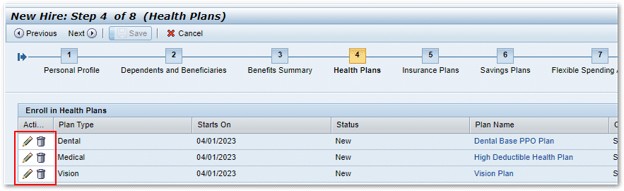
Review your current benefit elections, including medical, dental, vision, life insurance, flexible spending accounts, and other available benefits. Take time to compare your current elections with any plan changes before making updates.
Make changes by clicking on the pencil icon next to each Plan Type.
Enroll in a Health Savings Account (If Applicable)
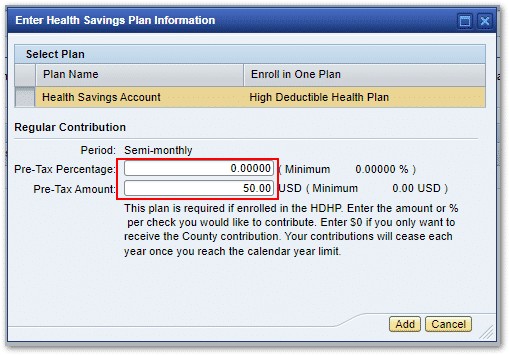
If you enroll in the High Deductible Health Plan (HDHP) for medical insurance, you must also enroll in a Health Savings Account (HSA). Select your contribution amount or percentage. If you do not wish to contribute, enter $0 to receive the County's contribution.
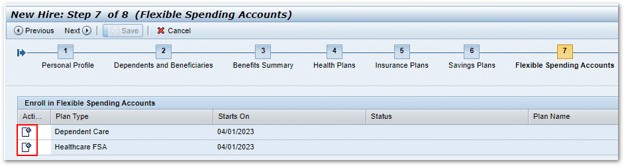
Enroll in a Flexible Spending Account (If Applicable)
If you want to enroll in a Healthcare Flexible Spending Account (FSA) or Dependent Care FSA, select the account you want to enroll in.
Enter Your Annual Contribution (If Applicable)
Enter the annual contribution amount you want to elect for your selected Flexible Spending Account. Review the minimum and maximum contribution limits before submitting your election.
Important: Flexible Spending Accounts (FSAs) require a new election each year and do not automatically roll over during Open Enrollment.
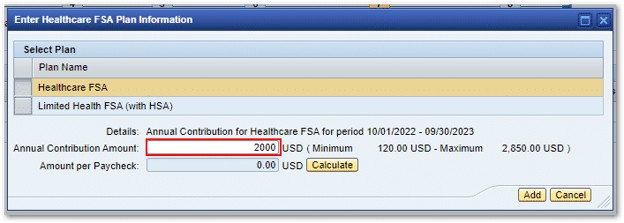
Note: Your annual election amount will be divided evenly across your paychecks for the plan year.
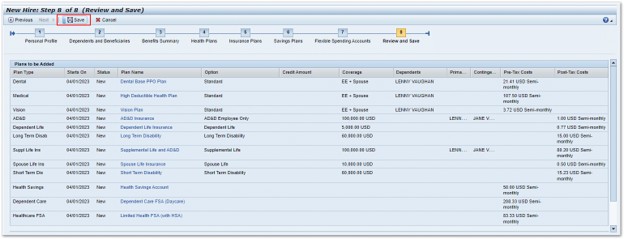
Review and Save
Review all of your benefit elections carefully before saving your changes before the Open Enrollment deadline.
Tip: Verify that you've completed any required enrollments, such as Flexible Spending Accounts (FSAs) or a Health Savings Account (HSA), when applicable.
After saving, you are encouraged to print your confirmation for your records. If you have questions about your benefit elections or need assistance after submitting your enrollment, contact the HRMD Benefits Team.
Retirees
Are you retired? The Open Enrollment process is different for retirees. Visit our Retirees page for information about your health benefits, enrollment process, and other retiree resources.